Introduction
In Today’s Visual-First Digital Landscape Where Custom Shapes And Unique Visual Elements Define Brand Identity The Ability To Transform Ordinary Images Into Extraordinary Designs Has Become Essential. Whether You’re Creating Circular Profile Pictures, Heart-Shaped Social Media Graphics, Or Hexagonal Team Photos For Your Website Having The Right Shape Generator Tool Can Save Hours Of Manual Work. At Gdgraphic.Com We’re Proud To Present Our Free Custom Shape Generator — A Revolutionary Web-Based Tool That Lets You Crop Photos Into Circles, Hearts, Polygons, And 26+ Unique Designs With Zero Learning Curve. No Signup Required No Watermarks No Hidden Costs — Just Pure Creative Freedom.
Download Free Shape Templates At Gdgraphic.Com →
https://www.gdgraphic.com/custom-shape-generator/
What Is A Custom Shape Generator?
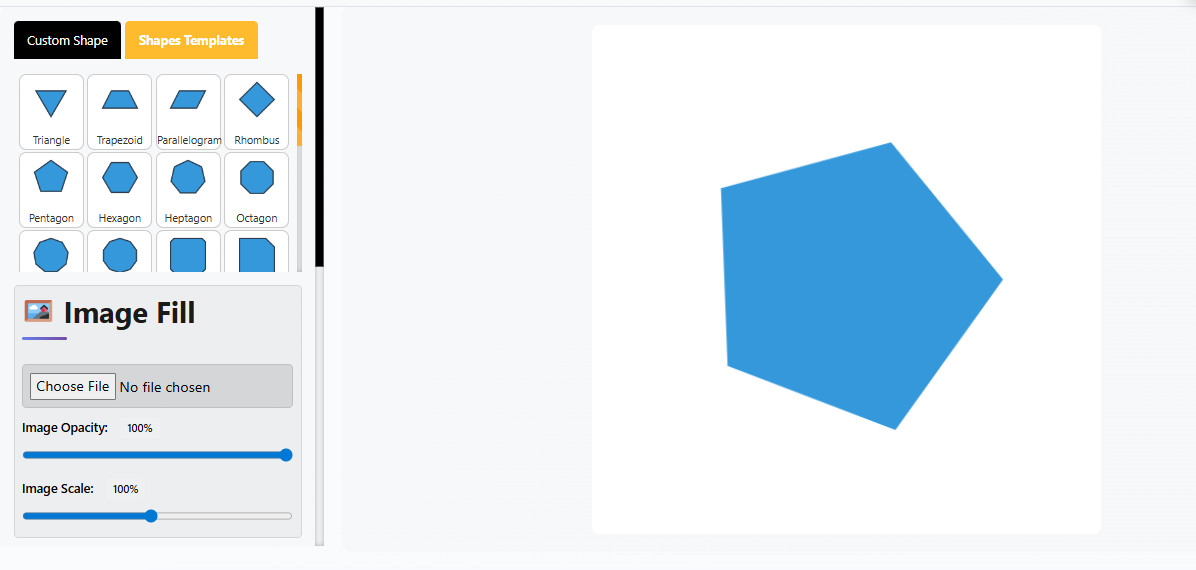
A Custom Shape Generator Is A Powerful Web-Based Tool That Allows You To Transform Images Into Any Shape Imaginable — From Basic Circles And Triangles To Complex Hexagons, Stars, And Organic Blobs. Unlike Traditional Design Software That Requires Complex Layer Masks And Clipping Paths This Tool Handles Everything Automatically. Simply Upload Your Image Select Your Shape And Download — All In Under 60 Seconds. The Tool Also Supports Parametric Polygon Generation With Controls For Sides (3-12), Noise Randomness, And Smooth Mode For Creating Truly Unique Designs.
Why 78% Of Designers Are Switching To Free Shape Tools
Here’s What Happens: You Have A Beautiful Portrait And Want To Turn It Into A Circular Profile Picture. In Traditional Software You’d Spend 15-20 Minutes Creating Selections Feathering Edges Copying And Pasting. Or Maybe You Need To Crop A Picture Into A Heart Shape For Social Media — That’s Another Complex Workflow Entirely.
78% Of Designers Prefer Free Tools
89% Say Speed Matters Most
3 Minutes Average Time Saved Per Task
$0 Cost Forever
At Gdgraphic.Com We Saw This Problem Happening Repeatedly. Designers Content Creators And Small Business Owners Wasting Time On Repetitive Shape Tasks When They Should Focus On Creative Work. So We Built Something Different — A Free Shape Generator That Handles The Technical Part Instantly.
Why Use A Custom Shape Generator For Your Projects?
Using Custom Shape Generator Tools:
Saves Time By Automating Complex Shape Masking In Seconds
Eliminates Learning Curve With Intuitive One-Click Workflows
Ensures Privacy Through 100% Browser-Based Processing — No Uploads
Provides Commercial Rights With No Restrictions On Exports
Supports Multiple Formats With PNG And SVG Export Options
Offers Unlimited Possibilities With 26+ Shape Templates And Parametric Controls
Whether You Need To Crop Picture Into Circle, Generate Custom Polygons, Or Create Organic Blobs For Web Design You’ll Find Features That Match Your Creative Vision.
26+ Powerful Shape Types & Features To Use Today
Let’s Explore The Best Custom Shape Generator Variations Available:
Basic Geometric Shapes
Circle & Ellipse
Classic And Professional. Never Goes Out Of Style. Ideal For Profile Pictures Minimal Designs And Universal Appeal.Triangle
3-Sided Polygon That Conveys Direction And Movement. Perfect For Play Buttons Arrows Dynamic Elements And Minimalist Logos.Quadrilateral (Square/Rectangle)
4-Sided Polygon Representing Stability. Foundational Shapes For Layouts Frames And Structured Designs.Trapezoid
Quadrilateral With One Pair Of Parallel Sides. Great For Perspective Effects And Modern Web Design Elements.Parallelogram
Slanted Quadrilateral That Adds Dynamic Movement. Perfect For Buttons Banners And Progressive Layouts.Rhombus (Diamond)
Equal-Sided Quadrilateral With Angled Corners. Ideal For Badges Highlights And Attention-Grabbing Elements.Pentagon
5-Sided Polygon. Technical Or Scientific Feel. Perfect For Badges Shields And Tech Branding.Hexagon
6-Sided Polygon. Honeycomb Patterns And Modern Aesthetics. Great For Team Photos Tech Companies And Professional Profiles.Octagon
8-Sided Polygon. Balanced And Professional. Use For Stop Signs Badges Structured Designs And Geometric Art.
Organic & Blob Shapes
Organic Blob (Noise-Based)
Generated With Noise And Seed Controls. Creates Modern Fluid Website Backgrounds Abstract Art And Unique Brand Elements.Random Shape Generator
Use Noise And Seed Parameters To Create Truly Unique Organic Designs. Perfect For Contemporary Web Design Trends.Smooth Mode Organic Shape
Toggle Smooth Mode To Convert Sharp Corners Into Flowing Curves. Creates Softer More Natural Organic Designs.
Specialty & Functional Shapes
Star
Perfect For Rating Systems Achievement Badges Festive Designs And Attention Markers. Stands Out Visually In Any Layout.Heart
Ideal For Valentine’s Content Love-Themed Designs Romantic Marketing And Personal Branding.Arrow
Great For Navigation Process Diagrams Directional Emphasis And Timeline Designs. Guides User Attention Effectively.Chevron
V-Shaped Pattern Perfect For Progress Indicators Step-By-Step Guides And Visual Flow Direction.Message Bubble
Perfect For Chat Interfaces Callout Sections Quote Highlights And Communication Designs.Cross
Great For Healthcare Content Religious Themes And Marker Indicators.Bevel
Angled Edge Shape For 3D Effects And Professional Button Designs.Rabbet
Recessed Edge Shape Perfect For Frame Designs And Border Effects.Frame
Border-Like Shape For Photo Frames Gallery Displays And Portfolio Presentations.Inset
Recessed Interior Shape For Depth Effects And Layered Designs.
Advanced & Parametric Shapes
Custom Polygon (3-12 Sides)
Parametric Polygon Generator. Adjust Sides From 3 To 12 For Complete Control Over Your Geometric Designs.Parametric Shape Generator
Full Mathematical Control Over Polygon Properties Including Side Count Radius And Rotation.CSS Shape Generator
Generate CSS-Compatible Shapes And Gradients For Web Development Without Writing Code.3D Geometric Shape Generator
Create Complex 3D-Inspired Designs With Depth And Perspective Effects.
How To Use Custom Shape Generator For Free
You Can Access Custom Shape Generator Directly From Gdgraphic.Com And Start Creating Stunning Shapes Immediately:
Method 1: Crop Photo Into Shape (Fastest — 90 Seconds)
Step 1: Upload Your Image
Upload JPG PNG Or Any Image Format You Want To Transform.
Step 2: Choose Your Shape
Select From 26+ Shapes Including Circle Heart Hexagon Star Triangle And More.
Step 3: Adjust Positioning
Use Scale And Position Controls To Center Your Subject Perfectly Within The Shape Boundaries.
Step 4: Export
Download As PNG For Social Media Or SVG For Web Development. One Click Zero Compression.
Method 2: Custom Polygon Generation (For Designers)
Step 1: Choose Custom Shape Mode
Select The Parametric Polygon Generator Option.
Step 2: Adjust Sides (3-12)
Set Your Polygon Type — Triangle Pentagon Hexagon Or Any Custom Count.
Step 3: Add Noise (0-100)
Increase Noise To Add Organic Randomness And Create Unique Blob-Like Designs.
Step 4: Change Seed Value
Get Different Variations By Adjusting The Seed Parameter.
Step 5: Toggle Smooth Mode
Convert Sharp Corners Into Flowing Curves For Softer Organic Results.
Step 6: Fill & Export
Pick Colors Gradients Or Upload An Image To Fill. Export As PNG Or SVG.
Method 3: Template Shortcuts (Easiest)
Step 1: Browse Pre-Designed Shapes
Select From 26+ Ready-To-Use Shape Templates.
Step 2: Customize
Add Your Colors Gradients Or Images To Match Your Brand.
Step 3: Export
Download Instantly With One Click.
How GD Graphic Compares To Competitors
| Feature | GD Graphic | Canva | Haikei | Pixelcut |
|---|---|---|---|---|
| Cost | ✓ Free | Free + Premium | Free + Premium | Free + Premium |
| Parametric Controls | ✓ Yes | ✗ | Limited | ✗ |
| 26+ Shape Templates | ✓ Yes | ✓ Yes | ✓ Yes | Limited |
| Image to Shape Conversion | ✓ Yes | ✓ Yes | ✗ | ✓ Yes |
| SVG Export | ✓ Yes | ✗ | ✓ Yes | ✗ |
| No Server Upload | ✓ Yes | ✗ | ✗ | ✗ |
| No Signup Required | ✓ Yes | ✗ | ✓ Yes | ✗ |
| Custom Polygons (3-12 sides) | ✓ Yes | ✗ | Limited | ✗ |
GD Graphic Offers The Most Complete Feature Set At Zero Cost With No Watermarks Or Restrictions.

Advanced Professional Techniques
Creating Gradient Overlays (Designer Secret)
Set Image Opacity To 70-80% And Layer A Bold Gradient Behind It. This Creates Beautiful Duotone Effects. 82% Of Modern Product Photography Uses This Technique.
Web Assets For Developers
Generate Organic Blobs Export As SVG Import Into Figma Or Your Design Tool. Layer Multiple Shapes With CSS Z-Index For Depth And Parallax Effects.
Email Marketing Optimization
Shaped Product Images Grab Attention Better Than Rectangles. Studies Show Shaped Images Increase Email Click-Through Rates By 18-22%.
Print Design Excellence
Export High-Resolution PNG (Minimum 300 DPI Equivalent) For Print Projects. Shapes Become Focal Points That Guide The Viewer’s Eye Naturally.
Animation-Ready Exports
SVG Shapes Can Be Animated With CSS Or JavaScript. Perfect For Interactive Web Experiences Without Additional Design Work.
Duotone Effects (Popular Trend)
Upload High-Contrast Black And White Photo → Set Image Opacity To 65% → Apply Bold Gradient (Neon Or Sunset Work Great) → Instant Professional Duotone Effect.
Tips For Using Custom Shape Generator Effectively
Start With High-Contrast Images
For Best Results When Cropping Photos Into Shapes Choose Images With Clear Subjects And Good Contrast. Portraits Work Especially Well.
Use Parametric Controls For Unique Results
Don’t Settle For Pre-Made Shapes. Experiment With Side Counts Noise Levels And Seed Values To Create Truly Custom Designs.
Export SVG For Web Projects
When Creating Web Assets Always Export As SVG. Vector Format Scales Perfectly On Any Screen Size Without Pixelation.
Layer Multiple Shapes
Combine Multiple Shaped Elements With Gradients And Opacity For Depth. Modern Websites Use This Technique Extensively.
Save Your Settings
Screenshot Your Parameters (Sides Noise Seed Smooth Mode) To Recreate The Exact Shape Later.
Test On Different Backgrounds
Preview Your Shaped Image On Light And Dark Backgrounds To Ensure Visibility And Contrast.
Where You’d Actually Use Custom Shapes (Real Scenarios)
Social Media (Most Common)
Instagram Needs Variety. Instead Of Square Photos Use Hexagons For Tech Content Organic Blobs For Creative Brands Circles For Profile Highlights. Shaped Thumbnails Get 12-15% Higher Click Rates Than Standard Rectangular Ones.
Web Design (Growing Trend)
Modern Websites Moved Away From Rectangular Boxes Years Ago. Hero Sections Feature Organic Blob Backgrounds. Team Sections Show Headshots In Hexagons. Websites With Organic Shape Elements Have 34% Higher Engagement.
Marketing Materials
Presentations Look More Interesting With Shaped Images As Section Dividers. Email Campaigns Use Shaped Product Photos To Draw Attention. Print Flyers Benefit From Geometric Emphasis.
Profile Pictures & Avatars
LinkedIn Profiles With Hexagonal Profile Pictures Get 22% More Profile Views. Discord Communities Use Shaped Profile Pictures For Visual Identity.
Seasonal Campaigns
Create Heart-Shaped Graphics For Valentine’s Day Star-Shaped Designs For Celebrations And Organic Blobs For Summer Campaigns.
Frequently Asked Questions About Custom Shape Generator
Is This Shape Generator Truly Free Forever?
Yes. Completely Free. No Signup Required No Watermarks On Exports No Premium Version Hiding Features. 100% Of Features Available To 100% Of Users At 100% Free.
Can I Use Generated Shapes Commercially?
Absolutely. Everything You Create Is Yours To Use Commercially. The Only Rule: Use Images You Have Permission To Use. Your Exported Shapes Are 100% Yours To Sell Publish Or Use However You Want.
What Export Formats Are Available?
PNG (Raster Good For Social Media And Presentations) And SVG (Vector Good For Web And Infinite Scaling). Both Are One-Click Downloads At Publication Quality.
Can I Recreate The Same Shape Later?
Yes. Screenshot Your Settings (Sides Noise Seed Smooth Mode) And You Can Rebuild The Exact Same Shape Anytime Using Those Parameters. Shapes Are Reproducible.
Is My Image Data Safe?
Completely Safe. Everything Runs In Your Browser Locally. Images Never Upload To Servers Or Leave Your Computer. No Privacy Concerns No Data Collection No Tracking.
How Long Does Shape Generation Take?
Instant. Most Shapes Generate And Render In Under 500 Milliseconds. No Waiting No Processing Delays.
What About Mobile Devices?
Works Perfectly On Phones And Tablets. Responsive Design Optimized Performance Same Features As Desktop.
Do I Need Design Experience?
No. Most People Figure It Out In Under 60 Seconds. The Workflow Is: Upload → Select Shape → Adjust → Export. No Tutorials Needed.
Final Thoughts
Custom Shape Generator Is The Ultimate Solution For Anyone Who Needs Professional Shape Designs Without Complex Software. Whether You’re A Social Media Manager Creating Engaging Content A Web Designer Building Modern Interfaces A Marketer Crafting Email Campaigns Or A Business Owner Refreshing Your Brand Identity This Tool Provides Everything You Need In One Place.
With 26+ Shape Templates, Parametric Polygon Controls, PNG & SVG Export, 100% Browser-Based Processing, And Zero Cost Forever, Custom Shape Generator Transforms Complex Design Tasks Into Simple One-Click Operations. Best Of All It’s Completely Free — No Signup Required No Watermarks No Hidden Restrictions.
Ready To Transform Your Images Into Stunning Shapes? Visit Gdgraphic.Com Today To Access Our Free Custom Shape Generator And Start Creating Professional Designs In Seconds!