QR Forge Pro
100% Working QR Code & Barcode Generator
Controls
Click to Add Logo in Center
Preview
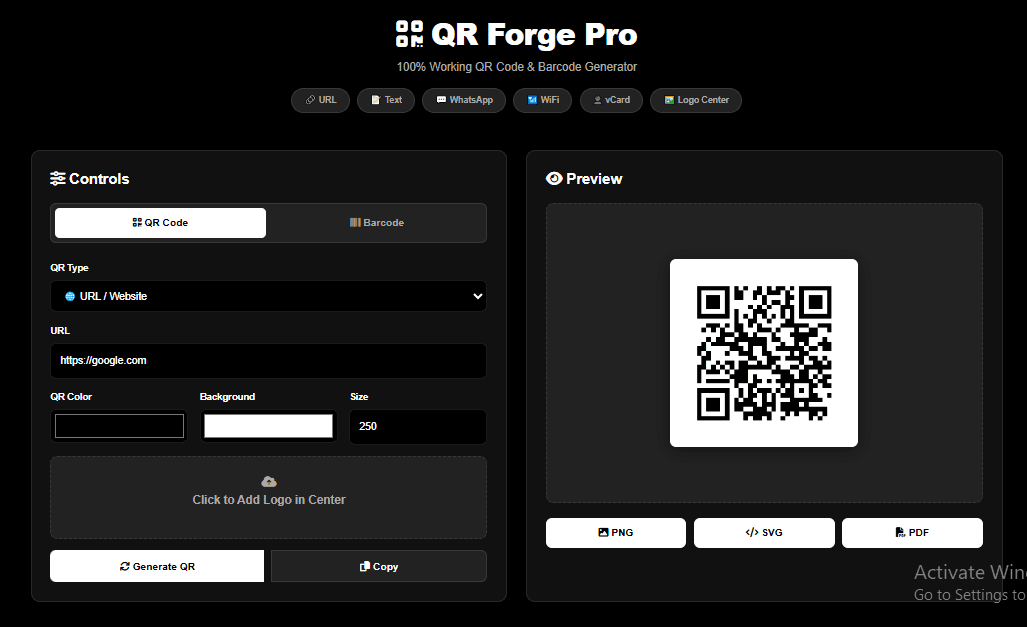
QR Forge: the ultimate free QR code & barcode generator (6 types, no signup)
From menus and business cards to WiFi access and product labels, QR codes and barcodes have quietly become essential tools for modern business and everyday life. QR Forge, the free browser-based generator from Gdgraphic.com, makes creating them effortless — no signup, no watermarks, and no cost. With 6 QR code types, 3 barcode formats, and full customization, it covers nearly every use case. Here’s your complete guide to getting the most out of it.
Table of contents
- 1. What Makes QR Forge The Best Free QR Code Generator
- 2. How To Create A QR Code Online Free — Step By Step
- 3. How To Create A WiFi QR Code For Your Home Or Restaurant
- 4. WhatsApp QR Code Generator: Let Customers Message You Instantly
- 5. vCard QR Code: Create A Digital Business Card In Seconds
- 6. Text QR Code Generator: Share Messages And Instructions Instantly
- 7. CODE128 vs EAN-13 vs UPC: Which Barcode Format Should You Use?
- 8. Free Barcode Generator For Inventory And Retail Labeling
- 9. How To Add A Custom Logo To Your QR Code
- 10. QR Code Color Customization: Branding Done Right
- 11. PNG vs SVG vs PDF: Best QR Code Export Format For Every Use Case
- 12. Best Free QR Code Generator For Business Cards And Marketing
- 13. QR Codes For Events And Conferences: Digital Badges Made Easy
- 14. Why Browser-Based QR Generators Are Safer Than Third-Party Apps
- 15. QR Codes For Product Packaging: A Guide For Retail Businesses
- Frequently Asked Questions (FAQs)
1. What makes QR Forge the best free QR code generator
QR Forge requires no account and adds no watermark to your downloads. It runs entirely in your browser, supports 6 QR types and 3 barcode formats, and gives you full control over color, size, and logo placement — completely free, forever.
2. How To Create A QR Code Online Free — Step By Step
Choose QR Code mode, select a type, enter your data, customize the appearance, then click Generate. Your code appears instantly in the preview panel, ready to download in PNG, SVG, or PDF.
3. How To Create A WiFi QR Code For Your Home Or Restaurant
Enter your network name (SSID) and password, and QR Forge encodes them into a single scannable code. Guests connect instantly without typing a password — perfect for cafes, restaurants, and guest rooms.
4. WhatsApp QR Code Generator: Let Customers Message You Instantly
Enter your WhatsApp number and generate a QR code that opens a chat directly. It’s an easy way to turn flyers, packaging, or storefronts into an instant customer support channel.
5. vCard QR Code: Create A Digital Business Card In Seconds
Add your name, phone number, and email to generate a vCard QR code. When scanned, your contact details save directly to the other person’s phone — no manual typing required.
6. Text QR Code Generator: Share Messages And Instructions Instantly
Encode any plain text — instructions, wedding details, or product notes — into a QR code. It’s a simple way to share information without long links or printed paragraphs.
7. CODE128 vs EAN-13 vs UPC: Which Barcode Format Should You Use?
Use EAN-13 for retail products sold internationally, UPC for North American retail, and CODE128 for internal inventory or alphanumeric data. QR Forge supports all three formats in one tool.
8. Free Barcode Generator For Inventory And Retail Labeling
Generate professional barcodes for product packaging or warehouse tracking. Set custom width and height for optimal scanning, then export as PNG or PDF for label printing.
9. How To Add A Custom Logo To Your QR Code
Upload your logo and it will appear centered within the QR code, reinforcing your brand every time someone scans it. Keep the logo under 25% of the total QR area to maintain scannability.
10. QR Code Color Customization: Branding Done Right
Adjust the foreground and background colors to match your brand identity — pull exact HEX codes from your logo with our Color Palette Generator. For best results, keep strong contrast between the two — dark codes on light backgrounds scan most reliably.
11. PNG vs SVG vs PDF: Best QR Code Export Format For Every Use Case
Use PNG for social media and general printing, SVG for websites and infinitely scalable graphics, and PDF for print-ready documents and multi-page materials.
12. Best Free QR Code Generator For Business Cards And Marketing
Generate compact, high-contrast QR codes at 200px for business cards, or scale up to 400px for posters and billboards — all while keeping brand colors and your logo intact.
13. QR Codes For Events And Conferences: Digital Badges Made Easy
Create vCard QR codes for speaker badges and registration desks so attendees can save contact details instantly, without exchanging physical business cards.
14. Why Browser-Based QR Generators Are Safer Than Third-Party Apps
Because QR Forge processes everything locally in your browser, none of your data is ever uploaded to a server — a safer choice than many app-based QR generators that store your information.
15. QR Codes For Product Packaging: A Guide For Retail Businesses
Combine EAN-13 or UPC barcodes with high-resolution QR codes linking to product details, care instructions, or warranty registration — giving customers more information at a glance. Retailers can also use our Invoice Generator to keep billing consistent with the same product codes.
Final Thoughts
QR Forge brings every QR code type and barcode format businesses and individuals actually need into a single, free, browser-based tool. Whether you’re connecting customers to WhatsApp, sharing WiFi access, or labeling retail products, it delivers professional results in seconds.
Try QR Forge free at Gdgraphic.com and start generating QR codes and barcodes today.
Frequently Asked Questions (FAQs)
1. Is QR Forge really free forever?
Yes. QR Forge is completely free with no signup, no watermarks, and no premium version — all features are available to everyone.
2. Can I use generated QR codes commercially?
Yes. All QR codes and barcodes you generate are yours to use commercially, with no restrictions or royalties.
3. What export formats are available?
QR Forge supports PNG for images and print, SVG for scalable web graphics, and PDF for print-ready documents.
4. Is my data safe when using QR Forge?
Yes. All processing happens locally in your browser — nothing is uploaded to a server, so your QR content never leaves your device.
5. Can I add my own logo to a QR code?
Yes. Simply upload a PNG or JPG logo, and it will appear centered within your generated QR code.
6. What barcode types does QR Forge support?
It supports CODE128 for alphanumeric inventory data, EAN-13 for international retail products, and UPC for North American retail.
7. What QR code types are available?
QR Forge supports URL, Text, WhatsApp, WiFi, and vCard QR codes, covering nearly every common use case.
8. Do I need design experience to use QR Forge?
No. Most users generate their first QR code in under 60 seconds by simply selecting a type, entering data, and clicking Generate.