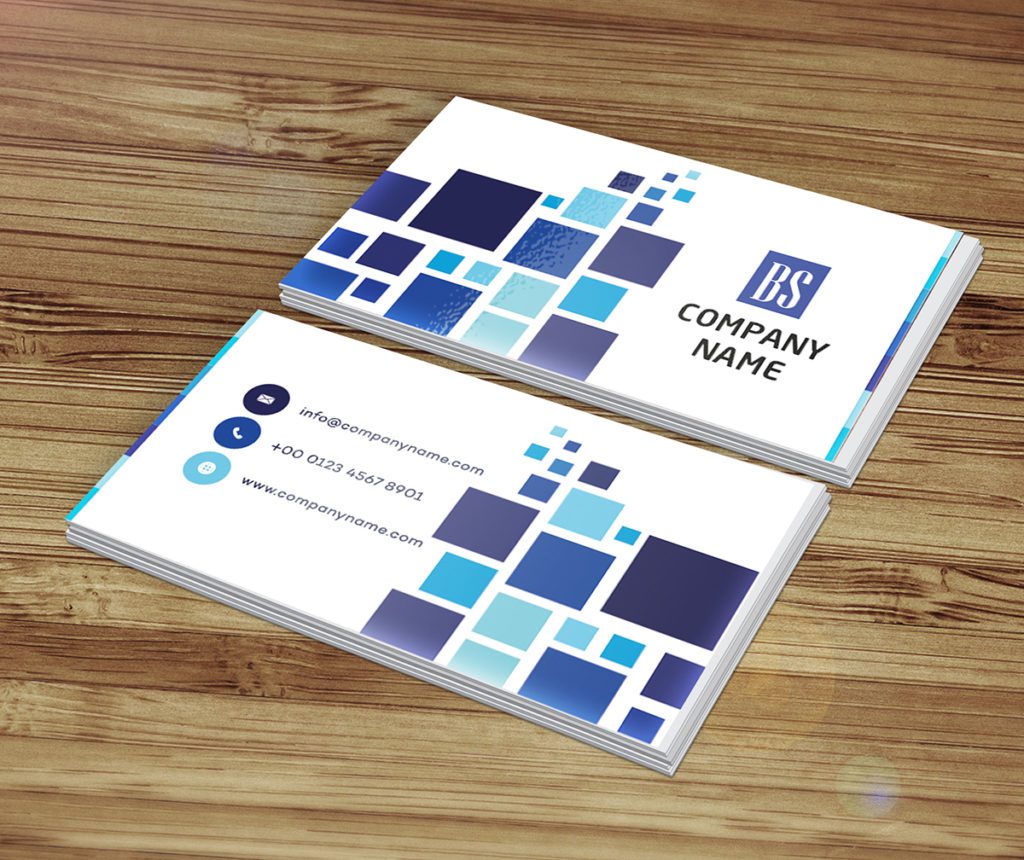
Best stylish business card design
 VECTOR SOURCE
Asset Overview & Description
In today’s fast-paced world making a memorable impression is essential for success in business. A stylish business card design not only reflects professionalism but also showcases individuality and creativity. In this comprehensive guide we’ll explore the art of crafting the best stylish business card design for modern professionals. From sleek layouts to bold typography let’s dive into the world of contemporary sophistication and create a business card that commands attention and leaves a lasting impression.
What are the key highlights of the best stylish business card design?
- Sleek & Minimalist Layouts: Embrace clean lines and well-balanced compositions for ultimate sophistication.
- Bold & Impactful Typography: Use modern sans-serif fonts in varying weights to establish visual hierarchy.
- Unique Shapes & Finishes: Stand out using die-cut designs, custom textures, or premium paper stocks.
What are the best modern design elements?
Begin with a sleek and contemporary layout that embraces clean lines and minimalism. Opt for a well-balanced composition that allows key elements to standout while maintaining a sense of sophistication.
Photo by https://kaboompics.com/ on Pexels
Choose bold and impactful typography that adds personality and flair to your design. Experiment with modern sans-serif fonts in varying weights and styles to create visual interest and hierarchy.
How do I use innovative design elements?
Stand out from the crowd with unique shapes and die-cut designs. Explore unconventional shapes or asymmetrical cuts that break away from traditional rectangular formats and add a touch of creativity to your business card.
Photo by https://kaboompics.com/ on Pexels
Incorporate eye-catching graphics or illustrations that reflect your brand personality and style. Whether it’s abstract patterns geometric shapes or custom illustrations visually engaging graphics can elevate your design to new heights.
Which vibrant color palette should I choose?
Embrace bold and vibrant colors that make a statement and reflect your brand identity. Experiment with contrasting color combinations or monochromatic schemes to create visual impact and grab attention.
Consider the psychological effects of color and choose hues that resonate with your target audience. Warm tones evoke energy and passion while cool tones convey professionalism and trustworthiness.
How do I approach branding and personalization?
Ensure consistency with your brand identity by incorporating brand colors logos and imagery into your business card design. Create a cohesive brand experience across all touchpoints to reinforce brand recognition and loyalty.
Photo by https://kaboompics.com/ on Pexels
Add personalization to your business card to make it memorable and meaningful. Whether it’s a handwritten note a custom illustration or a unique texture these personal touches create a connection with the recipient and leave a lasting impression.
Technical Specifications & Vector Preparation
| Feature | Specification |
|---|---|
| File Formats | .AI, .EPS, .SVG, .PDF |
| Recommended Resolution | 300 DPI for Print |
| Color Mode | CMYK |
| Standard Card Dimensions | 3.5 x 2 inches (with bleed) |
When prepping your files for professional vector printing via platforms like GDGraphic, ensuring accurate color separation and vector scalability is vital. Convert all text outlines to shapes to prevent missing font errors on different computer systems. Set up your document with a 0.125-inch bleed on all sides to avoid white edges during trimming.
What practical considerations matter for your business card design?
Design your business card with printability in mind ensuring that text and graphics are clear and legible. Pay attention to font size line spacing and color contrast to ensure readability especially in small print.
Photo by https://kaboompics.com/ on Pexels
Choose high-quality paper stock that complements your design and reinforces your brand’s premium image. Opt for thick durable cardstock with a smooth or textured finish for a luxurious feel.
How should you handle printing and production for your business cards?
Partner with a reputable printing company that specializes in high-quality business card printing. Choose a provider that offers customization options such as foil stamping embossing or spot UV coating to enhance your design.
Review print proofs carefully to ensure color accuracy alignment and overall print quality. Request samples or mock-ups to assess the final product before mass production.
Step-by-Step Customization Guide for Designers
- Select a Free Template: Browse GDGraphic’s extensive library to find a clean template matching your industry aesthetic.
- Customize Typography & Layout: Open the vector file in Adobe Illustrator or Figma, adjusting text layers with your specific name, title, and contact data.
- Adjust Color Schemes: Modify swatches using strict CMYK profiles to ensure your final printed colors match on-screen expectations.
- Export & Print: Save your final layout as a high-resolution press-ready PDF with crop marks enabled.
Conclusion
Crafting the best stylish business card design requires a balance of creativity professionalism and attention to detail. By incorporating modern design elements vibrant colors and personal touches you can create a business card that not only makes a memorable impression but also reflects your unique personality and style. So let your creativity shine through and create a business card that truly stands out in today’s competitive business landscape.
Frequently Asked Questions
What software is best for editing business card vector templates?
Adobe Illustrator, CorelDraw, and Figma are ideal for editing vector templates because they maintain crisp line quality and precise dimensions at any scale.
Why is CMYK preferred over RGB for business card printing?
CMYK uses cyan, magenta, yellow, and black inks to match how commercial printers produce color, whereas RGB is designed specifically for digital glowing screens.
What is a card bleed and why is it necessary?
A bleed extends your design artwork slightly past the trim edge (usually by 0.125 inches) to prevent unsightly white borders if the cutting blade shifts slightly during production.
How can I make my business card stand out without looking cluttered?
Focus on minimalism, prioritize white space, use high-contrast legible typography, and apply special finishes like matte lamination or spot UV on select logo accents.
| File Formats | .AI (Adobe Illustrator), .EPS (Vector), .SVG, .PNG Preview |
|---|---|
| Resolution / Quality | Vector Scalable (Infinite Resolution) • 300 DPI Print Ready |
| Layer Organization | Fully Layered, Organized Groups, Editable Text & Vectors |
| Usage License | 100% Free Forever (Personal & Commercial Projects) |
| Compatibility | Adobe Illustrator, Photoshop, Figma, CorelDraw, Inkscape, Affinity Designer |