News Blog Website
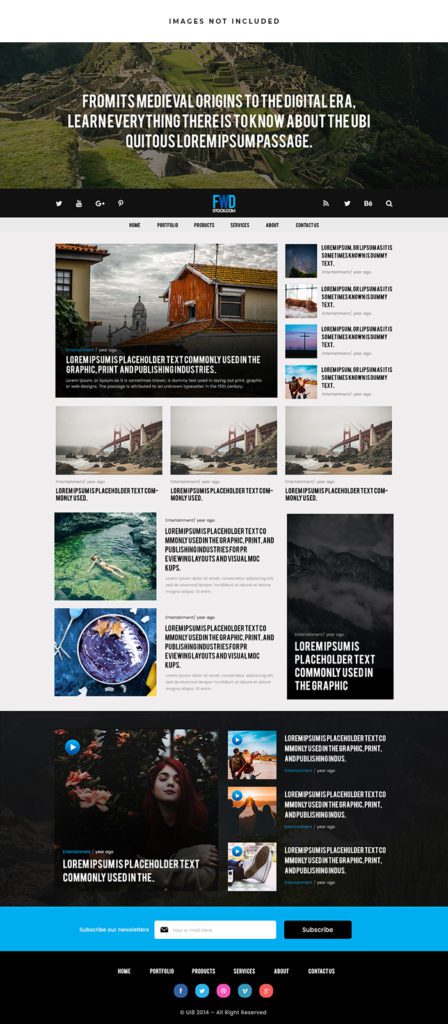 VECTOR SOURCE
Asset Overview & Description
Breaking News: Designing A Dynamic News Blog Website
Introduction
Welcome to the frontlines of digital journalism where every click scroll and share has the potential to shape the news landscape. In this guide we’ll delve into the art and science of designing a dynamic news blog website that informs engages and inspires audiences around the globe. From headline-grabbing layouts to user-friendly interfaces let’s explore the essential elements that make for a successful news blog website in today’s fast-paced media environment.

Key Highlights & Fast Facts
- Digital Sphere: Navigating from traditional media to social and independent blogs.
- Visual Hierarchy: Guiding readers with prominent headlines and clean layouts.
- Audience Engagement: Interactive features, polls, and social sharing tools.
| Element | Specification & Best Practice |
|---|---|
| Layout Strategy | Clean, clear, and fully responsive for mobile and desktop |
| Content Features | Breaking news alerts, multimedia integration, and featured stories |
| Monetization | Display advertising, sponsored content, and subscription models |
Understanding The News Landscape
Navigating The Digital News Sphere: Explore the evolving landscape of digital news consumption from traditional media outlets to social media platforms and independent news blogs.

Audience Analysis: Identify your target audience and their preferences interests and behaviors when it comes to consuming news online. Consider factors such as age demographics and geographic location.
Content Strategy: Define your editorial mission content categories and coverage areas to ensure consistency relevance and credibility in your news blog website.
- Step 1: Define Your Niche & Audience
Identify target demographics and establish a clear editorial mission for your news publication.
- Step 2: Build a Responsive Layout
Prioritize clear navigation, legible fonts, and mobile optimization across all devices.
- Step 3: Integrate Multimedia & Curation
Incorporate breaking news alerts, photo galleries, and video elements for deeper reader engagement.
Design Principles For News Blogs
Clean And Clear Layouts: Prioritize readability and usability in your website design with clear navigation menus legible fonts and intuitive user interfaces.
Visual Hierarchy: Use hierarchy to guide readers through your content with prominent headlines compelling images and succinct summaries that capture attention and encourage further exploration.
Responsive Design: Optimize your news blog website for mobile devices ensuring that it looks and functions seamlessly across smartphones tablets and desktop computers.
Always test your news site’s mobile typography and breaking news alert banners on real smartphones before launch to guarantee optimal readability during high-traffic news events.
Content Presentation And Curation
Breaking News Alerts: Implement features that enable real-time updates and breaking news alerts to keep your audience informed of the latest developments as they happen.

Featured Stories And Editorials: Highlight top stories investigative reports and opinion pieces with prominent placement on your homepage and category pages.
Multimedia Integration: Enhance your news coverage with multimedia elements such as videos photo galleries infographics and interactive maps to provide deeper context and engagement.
Engaging Your Audience
Interactive Features: Foster reader engagement with interactive features such as polls quizzes and comment sections that invite participation and feedback.

Social Sharing: Integrate social sharing buttons and widgets to encourage readers to share your news articles and amplify your reach across social media platforms.
Community Building: Cultivate a sense of community among your audience with user-generated content reader forums and live Q&A sessions with journalists and experts.
Monetization And Sustainability
Advertising Revenue: Explore monetization strategies such as display advertising sponsored content and affiliate marketing to generate revenue from your news blog website.
Subscription Models: Consider implementing subscription or membership models to offer premium content and exclusive benefits to loyal readers.
Diversification: Diversify your revenue streams with events merchandise sales and partnerships to ensure the long-term sustainability of your news blog website.
What are the core elements of a news blog design?
Clean layouts, strong visual hierarchy, responsive mobile design, and real-time breaking news alerts are essential.
How can independent news blogs monetize their content?
Monetization can be achieved through display advertising, sponsored content, affiliate marketing, and tiered subscription models.
Conclusion
As the digital news landscape continues to evolve the role of independent news blogs in shaping public discourse and holding power to account has never been more crucial. By following the principles and strategies outlined in this guide you can design a dynamic news blog website that informs engages and empowers audiences with timely relevant and impactful journalism. So roll up your sleeves gather your sources and get ready to break some news on your own terms with a news blog website that makes a difference.
| File Formats | .AI (Adobe Illustrator), .EPS (Vector), .SVG, .PNG Preview |
|---|---|
| Resolution / Quality | Vector Scalable (Infinite Resolution) • 300 DPI Print Ready |
| Layer Organization | Fully Layered, Organized Groups, Editable Text & Vectors |
| Usage License | 100% Free Forever (Personal & Commercial Projects) |
| Compatibility | Adobe Illustrator, Photoshop, Figma, CorelDraw, Inkscape, Affinity Designer |


