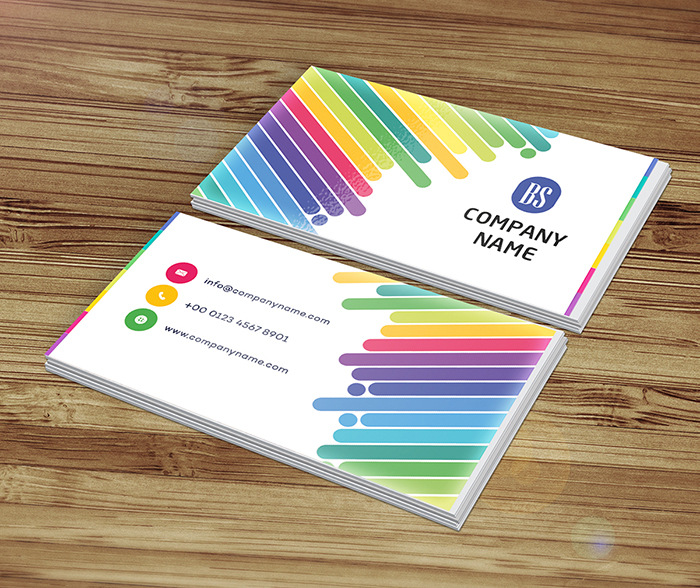
Eye Catching Multi lines Business Card Design
 VECTOR SOURCE
Asset Overview & Description
Key Highlights & Fast Facts
- Visual Impact: Multi lines create movement, energy, and instantly draw the viewer's eye.
- Directional Flow: Use diagonal, horizontal, and vertical lines to guide the gaze toward your name, logo, or contact info.
- Print Precision: Ensure designs are set in CMYK format and use premium specialty finishes like foil stamping or embossing for tactile appeal.
Crafting An Eye Catching Multi Lines Business Card Design
In the fast-paced world of networking and professional interactions, a captivating business card can be the key to making a lasting impression. A multi lines business card design, with its dynamic and visually engaging layout, has the potential to grab attention and leave a memorable impact on recipients. In this guide, we'll explore the art of crafting an eye-catching multi lines business card design that stands out from the crowd. From design principles to printing considerations, let's delve into the world of dynamic impressions and create a business card that commands attention and sparks conversation.
Understanding The Power Of Multi Lines
Visual Impact: Multi lines in a business card design create a sense of movement and energy, instantly drawing the viewer's eye and piquing their curiosity. By strategically arranging lines of varying thicknesses and orientations, you can create a dynamic composition that captivates the viewer and leaves a lasting impression.

Directional Flow: Lines can be used to guide the viewer's gaze and highlight key elements of the design such as your name, logo, or contact information. Experiment with diagonal, horizontal, and vertical lines to create visual interest and direct the flow of attention.
| Feature | Specification |
|---|---|
| File Formats | .AI, .EPS, .SVG, .PDF |
| Color Mode | CMYK (Print-Ready) |
| Finishing Options | Embossing, Foil Stamping, Spot UV |
| Paper Stock | High-Quality Matte or Glossy (350+ GSM) |
Design Elements And Composition
- Clean Layout:
Start with a clean and organized layout that provides a clear canvas for your multi lines design. Focus on essential information such as your name, job title, and contact details while leaving ample space for the lines to shine.
- Bold Typography:
Choose bold and modern fonts that complement the dynamic nature of your design. Experiment with different font weights, sizes, and styles to create hierarchy and visual impact.
- Strategic Placement:
Position your lines strategically to frame important elements of your business card and draw attention to key information. Consider using lines to create borders, dividers, or background patterns that enhance the overall composition.
Color Palette And Texture
Vibrant Color Choices: Experiment with a vibrant color palette that adds energy and excitement to your design. Consider using contrasting colors or complementary hues to make your lines stand out and create visual impact.

Texture and Finish: Enhance the tactile appeal of your business card with textured paper or specialty finishes. Embossing, foil stamping, or spot UV coating can add dimension and visual interest to your design, making it more memorable and engaging.
When applying foil stamping or spot UV over multi-line vector graphics, make sure your line weights do not fall below the printer's minimum stroke requirement (usually 0.25 pt) to prevent bleeding or filling in.
Branding And Personalization
Logo Integration: Incorporate your logo into the design seamlessly, ensuring that it stands out against the backdrop of multi lines. Experiment with different sizes and placements to find the perfect balance between visibility and integration.
Personal Touches: Infuse your business card with personal touches that reflect your unique style and personality. Whether it's a custom illustration, a meaningful quote, or a creative tagline, adding personal elements can make your business card more memorable and impactful.
Practical Considerations
Print-Friendly Design: Design your business card with printability in mind, ensuring that the lines are accurately represented in CMYK format and that text and graphics are positioned within the safe zone to avoid trimming issues.
Paper Selection: Choose a high-quality paper stock with a smooth finish that enhances the vibrancy of your colors and lines. Opt for premium materials such as matte or glossy paper to add a touch of luxury to your design.
Legibility And Accessibility: Ensure that your contact information is legible and accessible to recipients of your business card. Use a sufficient font size and contrast to ensure readability, especially for individuals with visual impairments.
Printing And Production
Professional Printing Services: Partner with a reputable printing company that specializes in high-quality business card printing. Choose a provider that offers customization options such as foil stamping, embossing, or spot UV coating to enhance your design.
Proofing Process: Review digital proofs carefully before finalizing your order to check for color accuracy, alignment, and any potential printing errors. Request physical samples if available to ensure that the finished product meets your expectations.
Quantity Planning: Determine the quantity of business cards you'll need based on your networking and marketing needs. Consider ordering a larger quantity to take advantage of bulk discounts and ensure you have an ample supply for future use.
Conclusion
Crafting an eye-catching multi lines business card design requires creativity, precision, and attention to detail. By harnessing the power of dynamic lines and incorporating them into your design with flair and sophistication, you can create a business card that captivates viewers and leaves a lasting impression with every exchange. So let your imagination soar, experiment with different line styles and arrangements, and create a business card that reflects your unique personality and professionalism in the most dynamic way possible.
What color mode should I use for multi-line business cards?
Always design your multi-line business cards in CMYK color mode to ensure accurate color representation during the professional printing process.
How can I make my multi-line business card stand out?
You can enhance the tactile appeal and visual depth of your design by incorporating specialty finishes like embossing, foil stamping, or spot UV coating alongside high-quality paper stocks.
| File Formats | .AI (Adobe Illustrator), .EPS (Vector), .SVG, .PNG Preview |
|---|---|
| Resolution / Quality | Vector Scalable (Infinite Resolution) • 300 DPI Print Ready |
| Layer Organization | Fully Layered, Organized Groups, Editable Text & Vectors |
| Usage License | 100% Free Forever (Personal & Commercial Projects) |
| Compatibility | Adobe Illustrator, Photoshop, Figma, CorelDraw, Inkscape, Affinity Designer |