Wedding website Blog
 VECTOR SOURCE
Asset Overview & Description
Introduction: Welcome To Eternal Bonds
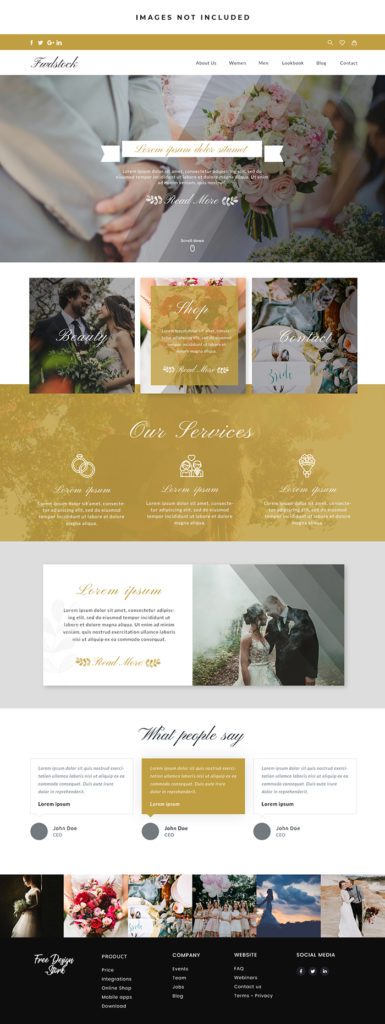
Welcome to Eternal Bonds where we weave together dreams, details, and “I do’s” to create a tapestry of love and celebration. In this guide, we’ll delve into the art of designing a wedding website blog that resonates with couples embarking on their journey to forever. From enchanting layouts to captivating visuals, let’s craft a digital haven that captures the essence of romance, joy, and timeless elegance.
Key Highlights & Fast Facts
- Vision & Narrative: Establish whether your blog focuses on real weddings, planning tips, or a blend of both with a sophisticated aesthetic.
- Digital Haven: Prioritize intuitive navigation, stunning visuals, and complete mobile optimization for readers on the go.
- Content Strategy: Feature real wedding chronicles, actionable planning guides, style spotlights, and engaging community connections.
- Monetization & Assets: Leverage affiliate marketing, vendor sponsorships, and high-quality vector assets from GD Graphic for professional polish.
How To Conceptualize Your Wedding Blog Vision?
Defining your digital identity requires careful forethought and alignment with your target audience’s deepest desires.
- Defining Your Narrative: Establish the narrative of your wedding website blog. Will it be a curated showcase of real weddings, a treasure trove of planning tips and inspiration, or a blend of both?
- Understanding Your Audience: Delve into the desires and dilemmas of your audience. What are their aspirations, anxieties, and aesthetic preferences when it comes to planning their big day?
- Envisioning Aesthetic Appeal: Conceptualize the visual identity of your blog. From color palettes to typography, envision a design that evokes the romance and sophistication of weddings.
How To Design Your Digital Haven?
Bringing your vision to life on screen requires a harmonious balance of form, function, and technical precision.
- Layout And Navigation: Craft an intuitive and immersive layout that guides visitors through the enchanting world of weddings. Ensure seamless navigation and effortless exploration of content categories.
- Visual Delights: Infuse your design with captivating visuals that stir the heart and inspire the imagination. From breathtaking photography to elegant illustrations, let every image tell a story of love and devotion.
- Mobile Optimization: Embrace mobile responsiveness to ensure that lovebirds can access your blog anytime, anywhere. Optimize layouts and images for mobile devices to deliver a seamless and enchanting experience on the go.
Always test your mobile layout on actual devices rather than just browser simulators. Touch targets for buttons and navigation links should be at least 48×48 pixels to ensure effortless browsing for brides and grooms planning on the move.
Curating Captivating Content
Keep your audience coming back by delivering value, emotion, and visual inspiration consistently.
- Real Wedding Chronicles: Chronicle the love stories of couples who’ve walked down the aisle. Feature real weddings with heartwarming narratives, stunning imagery, and insights into their journey from “Yes” to “Forever.”
- Planning Perfection: Provide a treasure trove of planning resources to guide couples on their path to wedded bliss. From checklists and timelines to vendor guides and budgeting tips, equip them with the tools they need to plan with confidence.
- Style Spotlights: Illuminate the latest trends and timeless classics in bridal fashion, décor, and themes. Showcase styled shoots, trend reports, and expert interviews to inspire couples as they envision their dream wedding day.
Engaging Your Beloved Audience
Building a loyal readership means moving past a static broadcast model and fostering a vibrant, interactive community.
- Community Connection: Foster a sense of community and camaraderie among your audience. Encourage interaction through comments, forums, and social media platforms where lovebirds can share their stories, seek advice, and find support.
- Social Showcase: Extend your blog’s reach and engagement through social media integration. Share enchanting snippets, behind-the-scenes peeks, and user-generated content to captivate followers and spark conversations.
- Newsletter Nuptials: Cultivate a dedicated following through newsletters that deliver curated content, exclusive offers, and insider insights directly to subscribers’ inboxes. Nurture relationships and keep love alive with regular updates and heartfelt messages.
Monetization Moments
Turn your passion project into a sustainable enterprise through strategic partnerships and value-driven offerings.
- Adoration And Affiliation: Cultivate partnerships and sponsorships with wedding vendors, venues, and brands that resonate with your audience. Integrate tasteful advertisements and sponsored content that enhance rather than interrupt the user experience.
- Affiliate Alchemy: Unlock revenue streams through affiliate marketing with trusted partners in the wedding industry. Recommend products and services that align with your blog’s ethos and earn commissions on qualified sales.
- Bespoke Offerings: Create premium offerings such as e-books, courses, and personalized consultations that provide added value to your audience while generating income for your blog.
Deep-Dive Into Vector Graphics & Layout Assets
When launching a professional wedding website blog, utilizing high-end vector elements, scalable graphics, and clean design templates from platforms like GD Graphic can drastically elevate your visual presentation. Vector graphics ensure that your floral motifs, geometric invitations, monograms, and custom badge designs remain crisp and pixel-perfect across retina displays and large desktop monitors alike. Designers and creative freelancers should structure their wedding blog assets utilizing organized layer panels, global color swatches, and vector outlines. This practice guarantees adaptability when modifying pre-made free templates, business cards, or aesthetic posters to match a specific bride’s wedding palette. By incorporating scalable vector assets, you ensure seamless web scaling and lightning-fast loading speeds, which are crucial for maintaining low bounce rates.
Technical Specifications for Print & Digital Harmony
Creating seamless brand consistency between your digital wedding blog and physical stationery (such as save-the-dates, invitations, and seating charts) requires strict adherence to technical design standards. Review the specifications below before exporting or preparing print-ready files:
| Asset Type | Color Mode | Resolution | Recommended File Formats |
|---|---|---|---|
| Wedding Website Blog Assets | RGB | 72 PPI / Web Optimized | SVG, WEBP, PNG |
| Print Invitations & Stationery | CMYK | 300 DPI / High Resolution | PDF, EPS, AI |
| Custom Monograms & Logos | CMYK / RGB | Vector (Infinite Scaling) | SVG, AI, PDF |
| Social Media Pin / Banner | RGB | 72 PPI | PNG, JPG, MP4 |
Step-by-Step Customization Guide for Your Wedding Blog Template
Follow this structured workflow to adapt your downloaded assets into a bespoke digital masterpiece:
-
Select Your Foundation
Download a clean, modern, and responsive website template or UI kit from GD Graphic that matches your wedding niche aesthetic.
-
Establish Typography Pairings
Combine an elegant serif headline font (such as Playfair Display or Cormorant Garamond) with a clean, readable sans-serif body font (like Inter or Montserrat) to achieve a luxurious yet legible look.
-
Configure Color Swatches
Define a primary palette consisting of romantic hues—dusty rose, champagne gold, sage green, or deep charcoal—and save them as global swatches in your design software.
-
Optimize Imagery
Compress all real wedding photography and styled shoot imagery using next-gen formats like WEBP to maintain swift page load performance without sacrificing visual clarity.
-
Test Across Devices
Preview your customized layout across mobile smartphones, tablets, and desktop browsers to verify flawless responsiveness and touch-friendly navigation.
Conclusion: Bringing Your Vision to Life
As we bid adieu to this guide, let’s raise our glasses to the timeless allure of weddings and the enduring power of love. By infusing your wedding blog design with passion, purpose, and creativity, you can create a digital sanctuary where dreams take flight and love stories unfold. So let your imagination soar, your creativity shine, and your heart lead the way as you embark on this enchanting journey with Eternal Bonds. Cheers to love, laughter, and happily ever after!
Photo by Markus Winkler on Pexels
Frequently Asked Questions
What software is best for editing free wedding blog templates from GD Graphic?
You can easily edit our free vector templates and design assets using industry-standard software including Adobe Illustrator, Figma, Adobe Photoshop, and CorelDraw.
Should I use RGB or CMYK color mode for my wedding website blog graphics?
For digital displays like wedding blogs, mobile apps, and social media, always use the RGB color mode at 72 PPI for accurate screen rendering and faster loading speeds. Save CMYK strictly for physical print items like invitations and menus.
How can I make my wedding blog stand out in a competitive niche?
Focus on a distinct visual niche, prioritize mobile-first optimization, use high-quality vector typography and custom monograms, and consistently publish deeply informative planning guides alongside real wedding features.
Are the design templates on GD Graphic completely free for commercial use?
Yes! GD Graphic offers an extensive library of free templates, logos, business cards, and vectors designed to support freelancers, small business owners, and creators in building gorgeous client projects without upfront costs.
| File Formats | .AI (Adobe Illustrator), .EPS (Vector), .SVG, .PNG Preview |
|---|---|
| Resolution / Quality | Vector Scalable (Infinite Resolution) • 300 DPI Print Ready |
| Layer Organization | Fully Layered, Organized Groups, Editable Text & Vectors |
| Commercial License | 100% Free Forever (Personal & Commercial) |
| Compatibility | Adobe Illustrator, Photoshop, Figma, CorelDraw, Inkscape, Affinity Designer |